Liquidations
What it is
A liquidation is when the exchange closes a leveraged position because the margin is not enough. The close is a market trade: a long is liquidated by a sell, a short by a buy. It is not someone's decision but a forced flow, and it may push the price further (a cascade).
More: how we calculate it
- The "Liquidations" panel on the right — Bybit and Binance, OKX and Gate — when enabled.
- "Liquidation history" — where positions have already been wiped out over 24 h (from OKX liquidations or the live Bybit stream); the mark disappears once the price passes the level.
- "Liquidation levels" — not a fact but an estimate from leverage: where liquidations will cluster if the price gets there.
- "Whale positions" — actual liquidation prices of large Hyperliquid positions: an arrow (long — down, short — up), a dashed line to the liquidation price and the label "whale $… ×leverage". The "from" and "at most" filters are in the layer settings. Whale card: direction and amount, leverage, margin, unrealized PnL, liquidation price and the distance to it. "This is not a model: the exchange will close the position exactly here." There is no position history.
- We have no month-long liquidation archive: the server keeps the latest events in memory. So this tab has no moments from history — only a snapshot of the layer now.
What it looks like in EVA
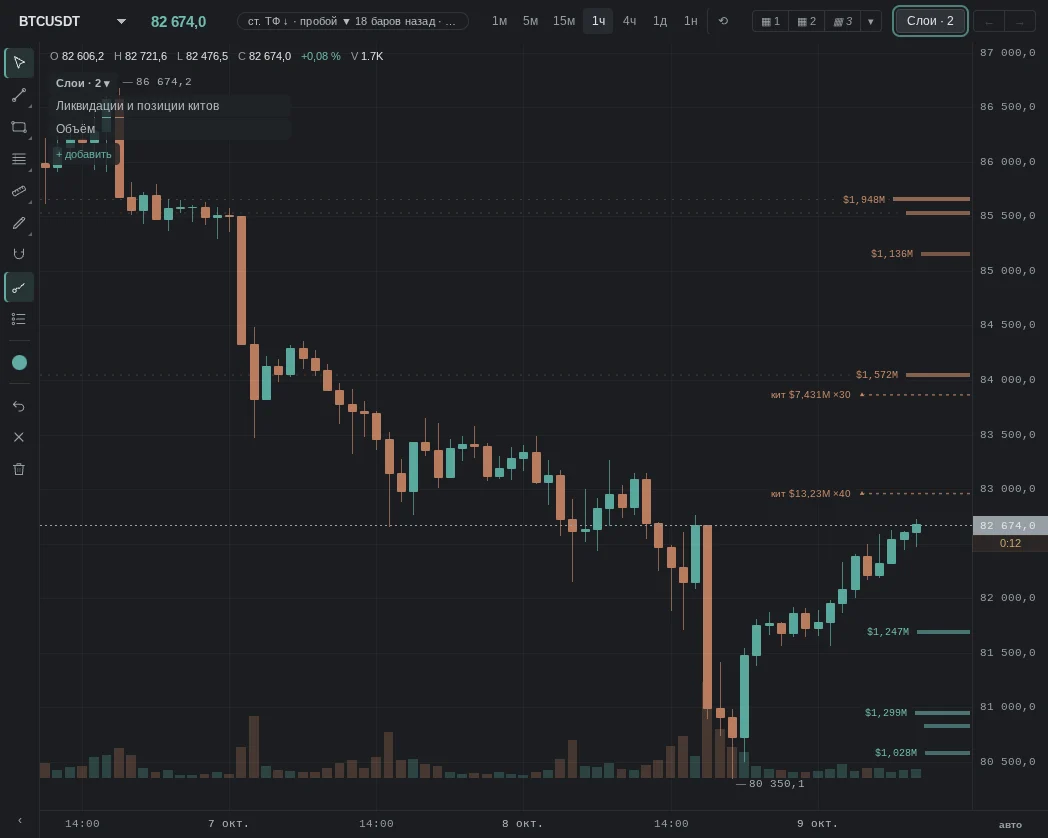
How it is read
Typical patterns: how traders read them and use them, and for each one a real moment from our history where it played out as a "textbook case". Moments where the same pattern failed are below, in "When it does not work".
We have no month-long liquidation archive — the server keeps the latest events in memory — so this tab has no real "textbook case" or "pattern failed" moments. The patterns below show how traders read them; you can check them on the layer's live chart.
1. Large long liquidations on a drop
How traders read it: many leveraged longs were closed — the selling was forced. Many expect pressure to ease after the "flush" and a bounce to follow.
2. Large short liquidations on a rise
How traders read it: many shorts were closed — the buying was forced. Many expect the rise to run out of steam after the short squeeze.
When it does not work
No pattern works every time: liquidations explain better whose leverage was flushed than they tell whether the flush is over.
Common traps
- The cascade is not over: a first wave of liquidations may be followed by a second one, a level lower (higher).
- Not all exchanges report liquidations in full — not everything is visible.
- Small coins: there a single liquidation moves the price, and a "cascade" is a couple of positions.
- News: on releases, liquidations go both ways within a minute.
See also
- OI — whether it dropped together with the liquidations.
- Funding — which side had overheated leverage.
- CVD — whether the flow continued after the cascade.
- Large Trades — do not confuse a liquidation with a large trade.
In the terminal: Liquidations and whale positions
The layer is split into parts, each turned on separately in the row settings: liquidation levels (estimated from leverage — where liquidations pile up if price gets there), whale positions on Hyperliquid (actual liquidation prices of large positions), options (max pain of the nearest expiry and large strikes), the CME gap and liquidation history. By default only the essentials are on: the eight largest levels, whales from $5M, max pain and a gap near price.
A whale level is the firmest of all: it is the exchange's number, not an estimate. The estimated map is a model. The archive check did not show price going more often to where more liquidations sit — the map did not act as a magnet.
Clicking a whale opens its card, and from there the account window: all-time result, positions, buffer before a forced close.
On the phone
The layer is split into parts, each turned on separately in the row settings: liquidation levels (estimated from leverage — where liquidations pile up if price gets there), whale positions on Hyperliquid (actual liquidation prices of large positions), options (max pain of the nearest expiry and large strikes), the CME gap and liquidation history. By default only the essentials are on: the eight largest levels, whales from $5M, max pain and a gap near price.
A whale level is the firmest of all: it is the exchange's number, not an estimate. The estimated map is a model. The archive check did not show price going more often to where more liquidations sit — the map did not act as a magnet.
Tapping a whale opens its profile: all-time result, positions, buffer before a forced close.