Order Book Heatmap
What it is
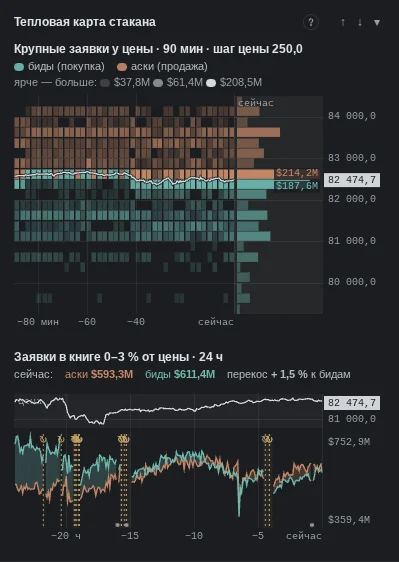
The heatmap draws the order book over time: horizontally — time, vertically — price, brightness — how much money was resting in orders at that price. A bright horizontal band is a large order that stood for a long time; short flashes are orders that were placed and pulled. The price line runs on top, so you can see what happens when the price approaches a bright band.
More: how we calculate it
- Panel on the right (“Large orders near price · 90 min”): a cell is the sum of orders at the level over the column's time; color — the side that is larger (buys or sells); brighter — more. The white line is the price (mid of the book).
- Layer on the chart (“Order book liquidity · history”): the aggregated book of six exchanges; orders larger than usual for their distance from the price are drawn; the “significant” setting — “top 5 %”, “10 %” (default) or “20 %”. Brighter and thicker — more.
- Standing and flickering. When an order leaves, the line breaks. On a detailed grid the value is averaged over the bar, so an order that stood the whole bar is brighter than one that flickered. “How long it stood” is shown separately by the densities in the order book (“standing N”).
- History. Detailed recording of the book to disk — since 07.10.2026; earlier — only memory for the last day or two. The boundary is marked with a dashed line on the chart.
- After a server restart the book refills from scratch — the section is darkened and marked “↻”. Magnifier — with the Alt key.
What it looks like in EVA
How it is read
Typical patterns: how they are read and how they are used. Examples from our history for these patterns will appear later — mechanical search has not found them yet, and we chose not to pick them by hand.
1. Price approaches a bright band and bounces
How it is read: a large limit participant was standing at the band, and it was enough. Many consider a long-standing band a level where a reaction is expected.
An example will appear later.
2. The band fades before the price
How it is read: the order was pulled before the touch. Many see this as a bluff (the order was there to scare) and expect the price to pass the level.
An example will appear later.
3. The band gets eaten
How it is read: brightness fades with each touch while the price stays at the level. Many expect that once the order is eaten through, the price will move further.
An example will appear later.
When it does not work
No pattern works every time: the heatmap explains better where orders were resting than whether they will hold when the price approaches.
Common traps
- Flickering liquidity: short bright dashes are orders that were pulled; on a fine grid the value is averaged over the bar, so an order that stood the whole bar is brighter than one that flickered.
- Brightness is relative: it is measured against what is usual for this coin and this distance from the price, not in absolute money.
- Server restart: after it the book refills from scratch — the section is darkened and marked “↻”.
- History is limited: detailed recording of the book to disk — since 07.10.2026; earlier — only memory for the last 48 hours.
See also
- Working with the order book — what is happening to this order right now.
- Traded at price — whether it was hit.
- Large Trades — who ate it.
- Order book and liquidity — the book's skew near the price.
In the terminal: Order book liquidity · history
Where large resting limit orders stood in the book — over time. The book is merged from six venues (Binance, Bybit, OKX, Hyperliquid, Bitget, Gate; Bitget and Gate give only levels near price) and snapshotted every 20 seconds (older than a day — every five minutes), in 0.2% price bands, ±4% around the price; the map uses everything stored — 48 hours. Only significant orders are drawn: larger than usual for their distance from the price on this coin (threshold in the layer settings: top 5, 10 or 20 %, default 10). Small liquidity is not drawn at all. Each significant order is a thin line at its level made of “beads”: a bead is a snapshot, and the line breaks when the order is pulled or filled. Thickness and brightness show size: small significant ones are thin dark-blue dots, the largest are thick and light, with a soft glow. Colour is one scale; a bid/ask tint can be turned on in the settings. A level is a 0.2% band: the book is not recorded more precisely.
These are orders, not trades. An order placed and pulled between snapshots is not on the map. Loupe: hold Alt and hover the map — what stood at that level is shown enlarged next to it (to keep it always on — in the “history” settings). The map's explanation is under the "?" in the bottom-left corner of the chart.