Working with the order book
What it is
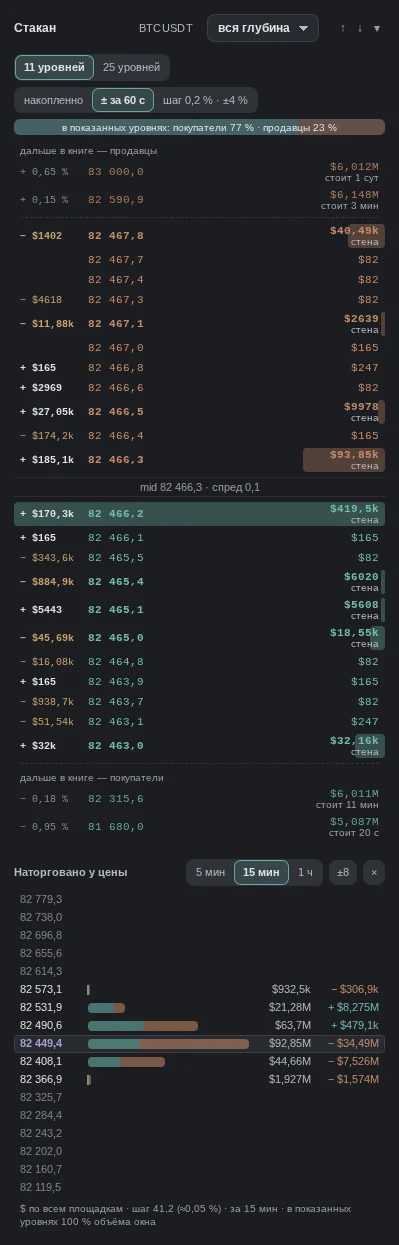
The order book is the queue of limit orders: who is ready to buy below the price (buyers, at the bottom) and sell above it (sellers, at the top). The panel on the right shows this queue live and, around it, what is being removed from it and added to it, where large orders sit further from the price, and what actually traded at each price. The order book shows intentions, not trades: an order can be pulled in a fraction of a second, so it is read together with the tape.
More: how we calculate it
- Ladder: the live Bybit book (perpetual futures); if the stream goes silent, the combined book of six exchanges is used instead. It updates many times per second while the coin is being viewed. Sizes are in dollars (price × quantity).
- "11 levels" / "25 levels": how many to show per side; the filter "full depth", "≥ $10k", "≥ $50k", "≥ $100k", "≥ $250k" hides levels smaller than the threshold. "cumulative": the sum from the best price to the level, i.e. how much has to be eaten for the price to get here.
- Left column. Without "± 60 s": a short flash of "+$X" or "−$X" when a level changes noticeably. With "± 60 s": the net change of money at the level over the last 60 seconds: "+" means added, "−" means removed. A level that dropped out because the price moved is not counted. A minus is both a cancel and a fill: the book does not tell them apart. Counting starts when the mode is turned on and resets when the coin changes.
- "step 0.2% · ±4%": the whole combined book of six exchanges within ±4% of the mid, in 0.2% bands; the snapshot age is in the header. The "in shown levels: buyers …% · sellers …%" bar: the share of buy and sell orders in the shown levels (in ±4% mode, across the full depth).
- "wall" in the ladder: a row noticeably larger than the others; "stands N" if a cluster of the same side sits nearby. "further in the book — sellers" / "further in the book — buyers": the nearest large orders beyond the last shown level: % from the mid, price, amount, "stands N".
- "Stands N": how long a large order has stood; if the price traded through the level, the count restarts. mid: the midpoint between the best bid and ask, spread: the price difference between them.
- "Traded at price": market buys and sells ($) by price over 5 min, 15 min or 1 h, all venues. "±8": how many levels to show above and below the price. The bar is the level volume, the green part is buys, the red part is sells; the numbers are volume and signed delta. The POC price of the window is highlighted in color.
- "Walls · Events": "pulled" or "filled": a large order is gone ("filled" if the price was nearby); "buyer cushion / seller overhang": the sum of orders in the 0–1 / 1–3 / 3–5% band at a size unusual for the coin. The note under the order book, "… well above normal · 3.4σ": σ is how far the sum of orders in the band deviates from its usual size; the "?" next to it explains how much is in the band now and what its normal level is.
What it looks like in EVA
How it is read
Typical patterns: how they are read and how they are used. Examples from our history for these patterns will appear later — mechanical search has not found them yet, and we chose not to pick them by hand.
1. A wall stands, the price approaches and bounces
How it is read: there is a large order at the level, "stands N min" keeps growing, the price touches and moves away. Many consider such a wall genuine: its owner is not afraid to show it.
An example will appear later.
2. The wall gets eaten
How it is read: the wall size melts, and in "Traded at price" volume against it grows at that price. Many expect that once the wall is eaten, the price will push through further.
An example will appear later.
3. The wall is pulled and placed further away
How it is read: in "± 60 s" there is a big minus at one level and an equal plus at the neighboring one; the price never reached the wall. Many see this as a participant who does not want the order filled.
An example will appear later.
4. The wall disappears as the price approaches
How it is read: a large order stood while the price was far away and vanished before the touch. This is called spoofing: the order was there to scare, not to trade.
An example will appear later.
When it does not work
No pattern works every time: the order book explains intentions better than it tells whether they will be filled: an order can be pulled in an instant.
Common traps
- "Pulled" does not mean "cancelled": a minus in "± 60 s" is both a cancel and a fill; the order book does not tell them apart, the tape does.
- One exchange in the ladder: the live ladder is the Bybit book; the "further in the book" clusters and the 0.2% step come from the combined book of six exchanges. Their numbers differ by construction.
- Iceberg: the visible order is small, but a lot gets filled; its size in the order book is misleading.
- The order book is not replayed in replay: the panel always shows the live book.
See also
- Order Book Heatmap: where orders stood over time.
- Large Trades: who hit the wall.
- Taker Aggression: whether there is enough pressure to eat it.
- Order book and liquidity: the book imbalance near the price on the chart.
In the terminal: Book & flow
The right column next to the chart: the order book, cumulative delta for futures and spot, positioning (open interest, funding, basis, long/short), the book heatmap, limit walls, large trades, liquidations, waves and wall events. Every block has a “?” — what it is and what it does not show. The \ key hides the column.
On the phone
The Book tab at the bottom of the screen: the order book as a ladder (asks above, bids below, the price, spread and imbalance between them), the tape of large trades, cumulative delta for futures and spot, positioning (open interest, funding, basis, long/short), limit walls, liquidations, waves and wall events. The “Book · Tape” switch is at the top. Every block has a “?” — what it is and what it does not show.